






AI Agents
Google Ads MCP: How to Connect Claude to Google Ads (2026 Guide)
 Aravind Sundar · · 16 min read
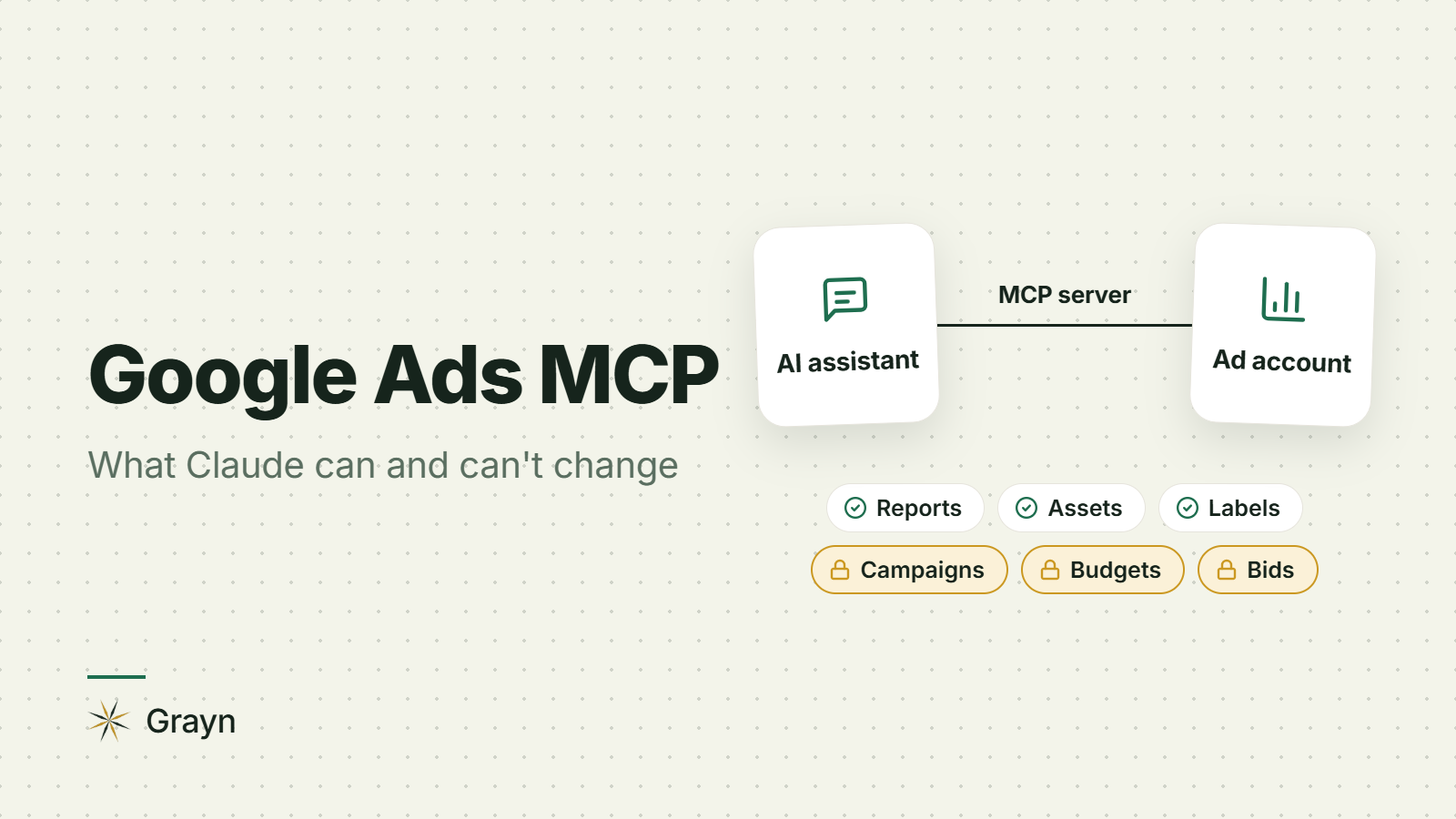
Google's official MCP server for Google Ads was read-only when it launched in October 2025. Its developer guide now describes something different. Claude can read your account, and once you confirm, it can create assets, upload videos and manage labels. Campaigns, ads, budgets and bids are still off limits.
Most of the guides ranking for this haven't caught up. They still call the server read-only, and plenty still open with "get your developer token", a setting Google retired on September 9.
So this is the version we'd hand a growth team today: what the server does now, how to connect it to Claude, what to lock before it can write anything, and where it stops being the right tool. There are prompts for app and D2C teams near the end.
What is the Google Ads MCP server?
It's Google's official bridge between AI assistants and the Google Ads API. The code is open source on GitHub, and Google's MCP server developer guide covers setup for Claude Code, claude.ai and Google's own Gemini CLI.
MCP, short for Model Context Protocol, is the standard that lets an assistant use another product's tools. Google's server turns your account into a short list of them. Ask "which campaigns spent the most last week?" and Claude fills in the report details, the server turns them into a GAQL query (Google Ads Query Language) and runs it, and Claude reads you the answer. You never have to look at the query unless you want to.
One difference from Meta matters more than any other. Meta hosts its ads MCP server for you. Google's runs wherever you put it: on your own laptop, or on a Google Cloud Run service your team manages. That shapes the whole setup.
Don't mix it up with Ask Advisor either. That's the Gemini-based agent built into the Google Ads interface. The MCP server is how an outside assistant gets in.
What changed since launch?
Two things, and both make older guides misleading.
It can write now, a little. Google's launch post described a read-only server. The current guide, last updated November 19, 2026, calls it read and partial mutate. Claude can create text, image, YouTube video, sitelink, callout and structured snippet assets, upload videos, and create labels and attach them to campaigns, ad groups and keywords.
The developer token is gone. Google sunset the developer token setting on September 9, 2026. Access now follows the API access level of the Google Cloud project that owns your OAuth client. More on that below.
What can Claude change once it's connected?
Less than you might expect, which is a good thing.
What Claude can do | Reads or writes | Asks you first? |
|---|---|---|
List every account your Google login can reach | Reads | No |
Pull reports on campaigns, ad groups, keywords, search terms, assets and conversions | Reads | No |
Create text, image, YouTube video, sitelink, callout and structured snippet assets | Writes | Yes |
Upload a video to YouTube through the API (local setup only) | Writes | Yes |
Create labels and attach them to campaigns, ad groups and keywords | Writes | Yes |
Attach an asset to a campaign, ad group or asset group | Can't | Not available |
Create, pause, enable or edit campaigns, ad groups or ads | Can't | Not available |
Change budgets or bids | Can't | Not available |
Here's how that plays out. Ask Claude for four new sitelinks and it'll draft them, show you the proposal and create them once you approve. Then you open Google Ads and attach them to the campaign yourself, because the server can't.
Compare that with Meta's server, which can raise a budget on a live ad set or switch delivery on. Google's is the more careful of the two. The worst a bad prompt can do here is leave you with a pile of unused assets or mislabeled campaigns. Annoying to clean up, but no money moves.
Each write runs in two steps. Claude first does a dry run and shows you what will change, along with a checksum. When you say yes, it sends the identical request, and the server rejects it if anything changed in between. Google is clear that the checksum isn't access control. It stops a request from drifting between proposal and approval, and that's all. Who's allowed to change what still comes down to the locks further down.
What do you need before you connect?
A bit more than with Meta. Four things:
A Google Cloud project with the Google Ads API turned on. That alone gives you Test access, which only works with test accounts.
Production access for that project. Without it, every call to your real account fails with a CLOUD_PROJECT_NOT_APPROVED_FOR_PRODUCTION error. Whichever project owns your OAuth client decides the level.
An OAuth client in that project, plus a Google login that can see the ad account.
A Claude plan with custom connectors, if you want it in claude.ai. Every plan has them, Free included, though Free is capped at one (Anthropic's guide). On a Team plan, only Owners and Primary Owners can add one. You'll see vendor pages saying the free plan can't do this. Anthropic says it can.
Here are the access levels, from Google's access levels page:
Access level | Works on | Daily operations | How you get it |
|---|---|---|---|
Test | Test accounts only | 15,000 | Automatic when you turn on the API |
Explorer | Test and live accounts | 2,880 on live accounts | Apply on the API's Overview page in Cloud Console. Most reviews are automated |
Basic | Test and live accounts | 15,000 | Apply after brand verification |
Standard | Test and live accounts | Unlimited | Apply on the Overview page. Review takes about 10 business days |
For one marketer asking questions, apply for Explorer. It does block a few services, including Keyword Planner, audience planning, billing, user management and account linking. If you want Claude pulling keyword ideas, you'll need Basic, and that means brand verification first.
How do you connect Claude to Google Ads?
Pick the path by who's going to use it. If it's just you, run the server on your own computer, and don't build a cloud service for one person. If the whole team wants it in claude.ai, that's a job for a developer and Cloud Run.
On your computer: Claude Code or Claude Desktop
Install Python 3.10 or later, pipx and the gcloud CLI.
In Google Cloud Console, create an OAuth client for your project and download its JSON file.
Sign in with the Google Ads scope:
gcloud auth application-default login \
--scopes=https://www.googleapis.com/auth/adwords,https://www.googleapis.com/auth/cloud-platform \
--client-id-file=PATH_TO_CLIENT_SECRET_JSON
Add the server to your MCP config. Claude Code reads it from ~/.claude/settings.json. In Claude Desktop, open Settings, then Developer, then Edit Config, and add the same block.
{
"mcpServers": {
"google-ads-mcp": {
"command": "pipx",
"args": ["run", "--spec", "google-ads-mcp==0.0.6", "google-ads-mcp"],
"env": {
"GOOGLE_CLOUD_PROJECT": "PROJECT_ID",
"GOOGLE_APPLICATION_CREDENTIALS": "PATH_TO_CREDENTIALS_JSON"
}
}
}
}
If you reach your accounts through a manager (MCC) account, add GOOGLE_ADS_LOGIN_CUSTOMER_ID to the env block, as 10 digits with no hyphens.
Restart Claude and ask: "List the Google Ads accounts you can access. Don't create anything." If account IDs come back, you're in.
Pin the version like the example does. From version 0.0.6 the tool names carry prefixes (search_search instead of search), so anything written for an older version may need a tweak.
In claude.ai: through Cloud Run
Hand this one to a developer. The short version of Google's steps:
Build the server image from the v0.0.6 release.
Create a Web application OAuth client and add https://claude.ai/api/mcp/auth_callback as an authorized redirect URI.
Add the Google Ads scope on the OAuth consent screen. If the screen is still in Testing, add everyone who'll connect as a test user, or their sign-in fails.
Deploy to Cloud Run with the OAuth client ID and secret set. Keep the secret in Secret Manager.
In Claude, add a custom connector pointing at https://YOUR-SERVICE-URL/mcp, choose OAuth, and enter the client ID and secret.
One line in Google's guide deserves more attention than it gets. Never deploy with --allow-unauthenticated unless the OAuth client ID and secret are set. Skip them and the server falls back to the container's own credentials, which hands your service account's access to anyone who finds the URL. None of the setup guides we read mention it.
What should you lock down before Claude can write anything?
The write tools are narrow, but narrow isn't zero. Five settings, roughly in the order you'd make them.
1. Start with the write tools switched off. Put a tools_config.yaml file next to the server with the asset and label tools turned off:
namespaces:
customers: true
search: true
metadata: true
labels: false
assets: false
Once the list has anything in it, every category you leave out is off. And if the file is missing or broken, the server refuses to start rather than falling back to defaults, which is the failure you want. Run it this way for the first couple of weeks. When you want Claude making sitelinks, switch assets back on.
2. Sign in as a read-only Google Ads user. Claude works with the access of whoever signs in. Add a user with Read only access to the ad account in Google Ads (Admin, then Access and security) and connect as them. Then a bad request fails at Google's end, whatever the prompt says. If you later turn the asset tools on, that user needs Standard access. Agencies should connect through a login that only sees the client accounts that have agreed to this.
3. Keep every write on approval in Claude. Never choose "Allow always" for a tool that creates something. When the approval appears, read the actual values in the request, not just the one-line summary above them. You can also switch individual tools off from the tools menu in a chat.
4. Turn the write tools off before anyone runs Research. Anthropic's connector docs say Research can call connector tools without asking for approval. It's an easy one to miss.
5. On Cloud Run, never skip the OAuth client. See the warning above. It's the only lock on this list where getting it wrong exposes more than your ad account.
One habit carries over from Meta. Keep untrusted text (competitor ads, landing pages, a freelancer's brief) out of any chat that can write, because hidden instructions in it can steer what Claude does next. We explain prompt injection properly in our Meta Ads MCP guide.
Which route should an app or D2C team pick?
Google's server isn't the only way in. Here's how the options compare once you care about who can change what.
Route | Setup | What it can change | Pick it when |
|---|---|---|---|
Google's server, on your computer | Cloud project, OAuth, a terminal | Assets and labels, after you confirm | One person wants answers and your data shouldn't pass through another vendor |
Google's server on Cloud Run | A developer and a Cloud Run service | Assets and labels, after you confirm | The team wants it in claude.ai and you already run Google Cloud |
A hosted third-party connector | Paste a URL, sign in with Google | Depends on the vendor. Some change budgets and bids | You want several ad platforms behind one connector and you've read their data policy |
Your own server on the Google Ads API | Developer time plus an access level | Anything the API allows | You need write actions Google's server leaves out, and someone can maintain the code |
Ask Advisor, inside Google Ads | None, if your account is eligible | Pause, rename, location and daily budget changes, with your approval | You work in the Google Ads interface anyway. It's in beta and not available in manager accounts |
An agent in Slack, like Grayn | Sign in with Google, pick ad accounts | New campaigns, created paused, after your team confirms | The team needs reports, alerts and campaign launches where it already talks |
Our default for most consumer marketing teams is Google's server on one analyst's laptop for deep questions, with the write tools off. Anything the whole team needs every day belongs somewhere shared. It's the same line we draw in what to let an AI agent change: read and draft freely, and keep a person on anything that spends money.
What should you ask Claude first?
Ask about yesterday or earlier. Google refreshes clicks, impressions and cost about hourly, most stats run less than three hours behind, and conversions credited by models other than last click can take up to 15 hours (Google's data freshness page). Impression share only updates once a day. Ask for "today so far" at noon and the day will look worse than it is.
These five cover the basics. Swap in your own account ID and numbers.
Account check
List every Google Ads account you can access, with its ID and currency, and the tools you have. Don't create or change anything.
Wasted search spend (D2C)
For account [ID], list the search terms from the last 30 days that spent more than $50 with zero purchases. Sort by spend and group them by campaign.
Cost per install check (apps)
For account [ID], show cost, installs and cost per install by campaign for the last 7 days against the 7 days before. Our target CPI is $[X]. Flag every campaign above it and tell me what changed underneath.
Performance Max against Search
Compare Performance Max and Search campaigns in account [ID] over the last 30 days against the 30 days before. Show spend, conversion value and ROAS for each type.
Your first write
Draft four sitelinks for account [ID] pointing to [pricing URL], [reviews URL], [shipping URL] and [returns URL]. Show me the proposal and wait for my yes before creating anything.
If you run app campaigns, remember that Claude reads Google's numbers. Installs and in-app events come back the way Google Ads attributes them, and that won't match your MMP or your subscription data. Check against your source of truth before a budget call. It's the same reason Meta and GA4 never report the same number.
Where Grayn fits
Google's server gets one assistant into one Google Ads account, for whoever is asking. For most consumer marketing teams, three things are still missing. It can't create a campaign. It only works when someone opens a chat. And whatever it finds stays in that chat instead of where the team works.
That's the gap we built Grayn for. It's a proactive AI for consumer marketing teams that lives in Slack and connects to Google Ads, Meta Ads, GA4, Search Console, Tag Manager and RevenueCat. For Google Ads, the day to day looks like this:
Launch a campaign from a Slack message. Ask something like "@Grayn set up a Search campaign for the spring sale, $150 a day, on our US account." Grayn asks for anything missing (campaign name, daily budget, campaign type, ad account), then shows exactly what it will create before it writes anything. It builds Search, Display, Video, Performance Max and Demand Gen campaigns.
Nothing goes live by accident. Nothing is created until someone on your team confirms in Slack, and new campaigns are created paused. No money is spent until your team starts them.
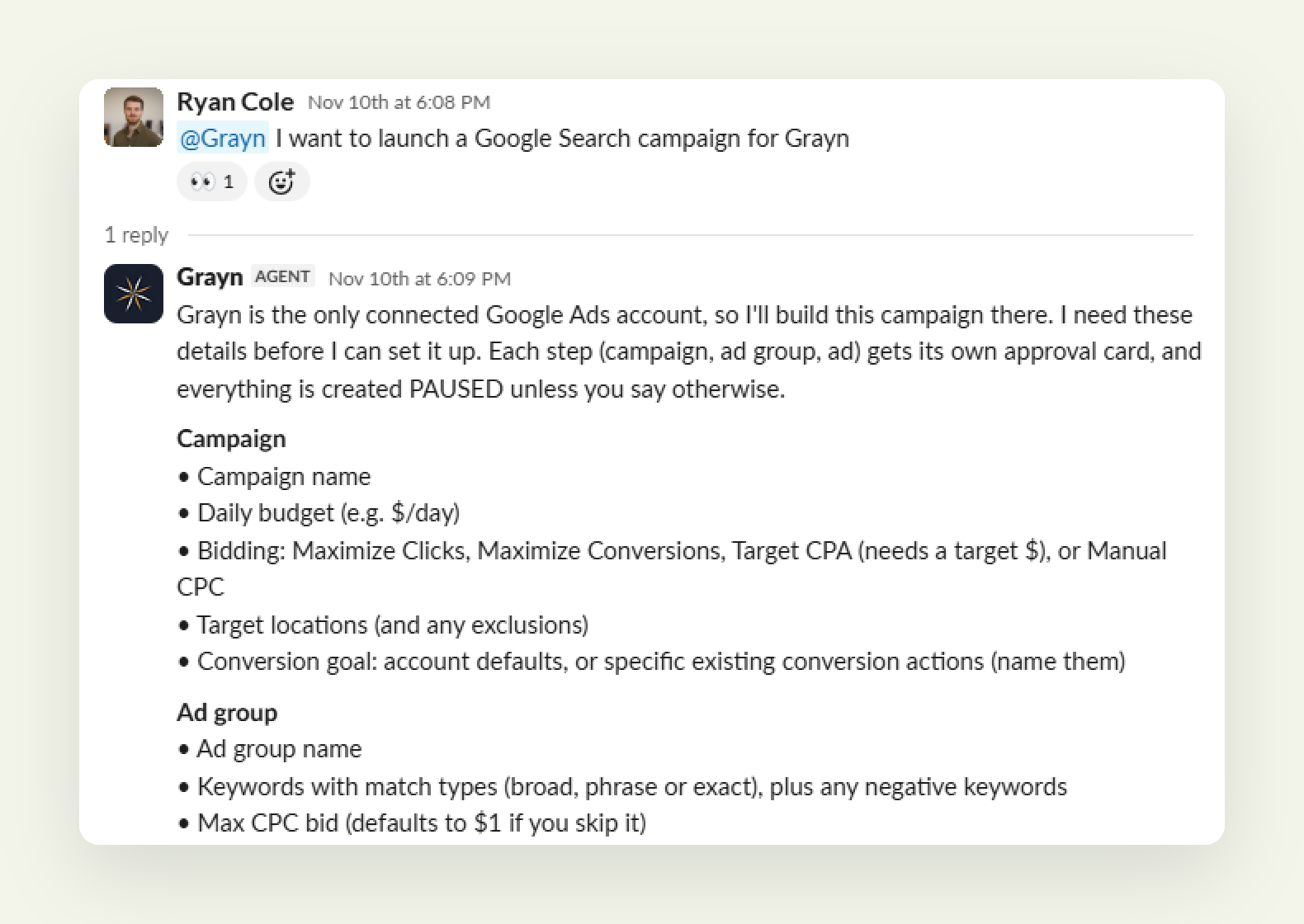
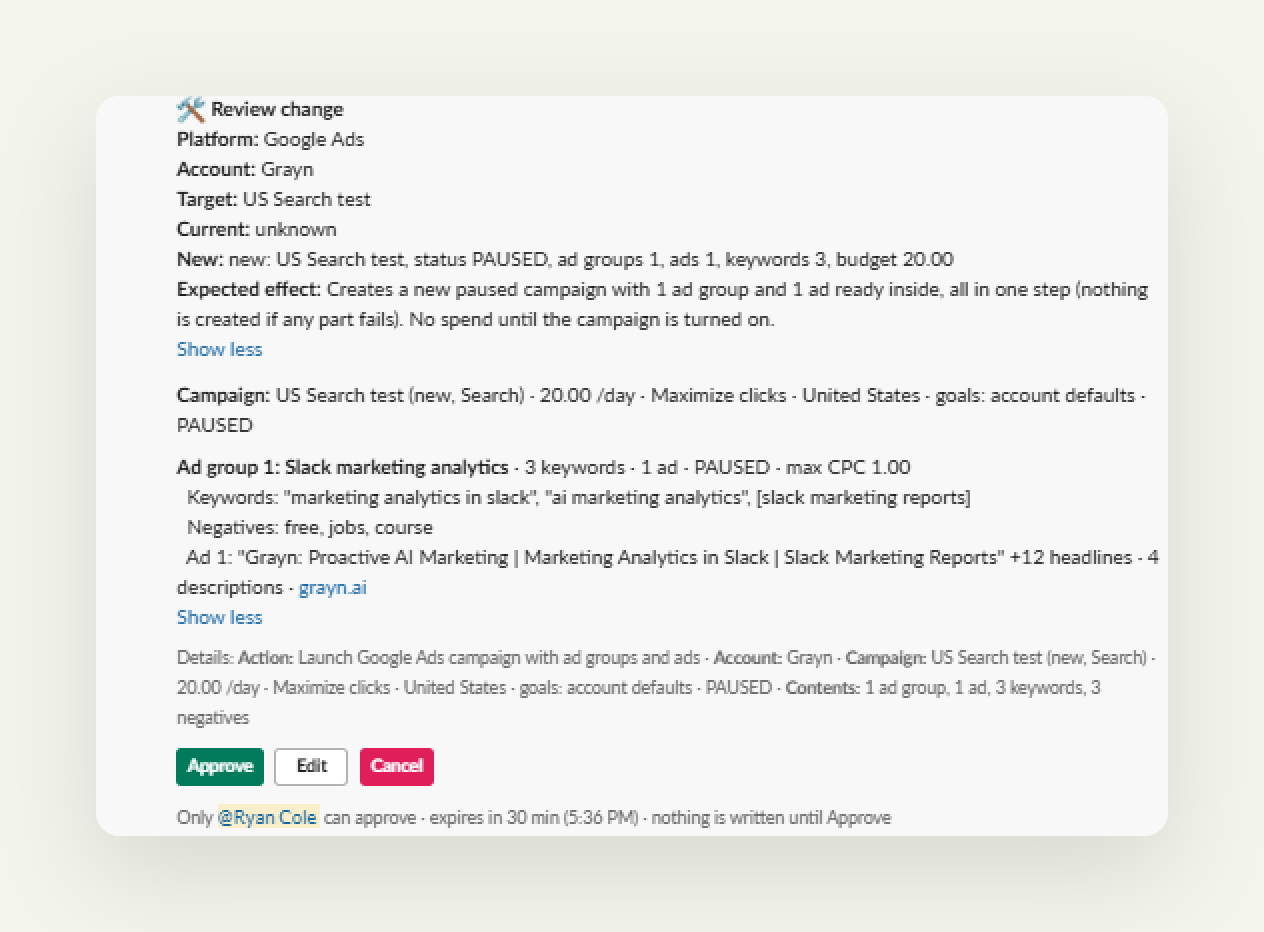
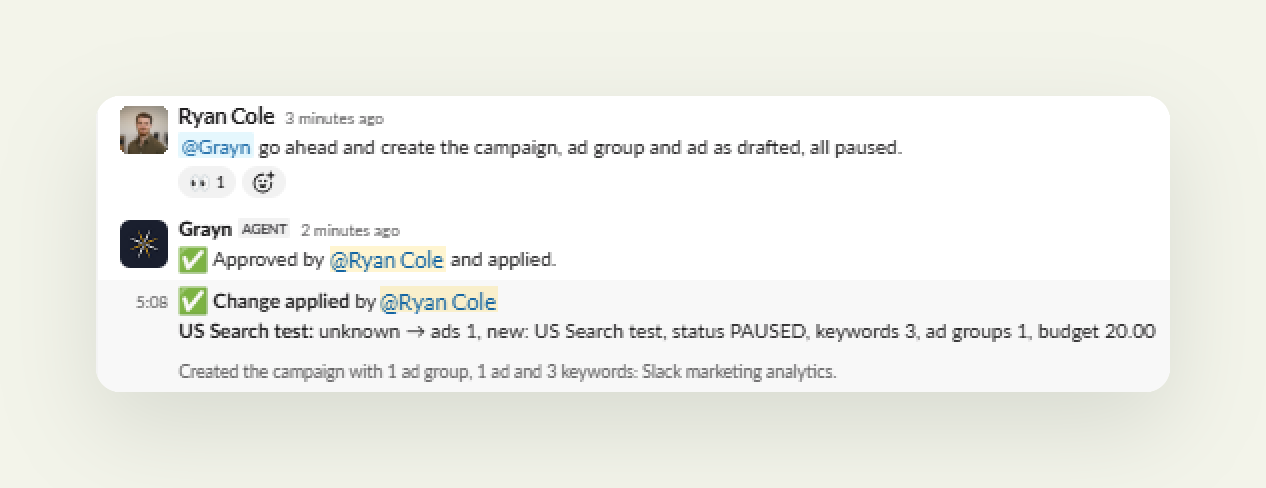
Ask in Slack. Spend, conversions, CPA, ROAS and pacing come back in the thread with live numbers and a chart, so the whole team sees the answer. Compare two periods, or Google Ads against Meta, in one question.
Alerts when something moves. Set a target and Grayn posts when CPA, ROAS or spend crosses it, when a daily budget cap is hit, or when a campaign is pacing ahead or behind.
Reports on a schedule. Daily or weekly, at the time you pick. Scheduled reports work on free Slack plans too.
Live campaigns stay with your team. Grayn doesn't touch budgets, bids or keywords on campaigns that are already running.
Claude + Google's MCP server | Grayn | |
|---|---|---|
Create a campaign | No | Yes: Search, Display, Video, Performance Max and Demand Gen, created paused once your team confirms |
Change budgets or bids on live campaigns | No | No, that stays with your team |
When it works | When someone opens a chat and asks | When asked in Slack, plus alerts and scheduled reports |
Who sees the answer | The person in the chat | Everyone in the Slack channel |
Channels | Google Ads, through this connection | Google Ads, Meta Ads, GA4, Search Console, Tag Manager and RevenueCat |
Setup | Cloud project, OAuth client and an API access level | Sign in with Google and pick your ad accounts |
Best for | One person digging into one account | What the whole team needs to see and act on every day |
Use both. Claude with Google's server is great for the Friday afternoon deep dive. Grayn handles the questions, alerts and launches your team deals with every day. You can build Google Ads campaigns from Slack on the same account you connect to Claude.
Start free with $200 in credits. No credit card needed.
FAQ
Is there an official Google Ads MCP server? Yes. Google publishes it as open source at github.com/googleads/google-ads-mcp, with setup steps in the Google Ads API developer guide. The server itself is free. If you host it on Cloud Run, you pay for Cloud Run.
Is the Google Ads MCP server read-only? Not anymore. It launched read-only in October 2025. Google's current guide describes it as read and partial mutate: assets, video uploads and labels, each confirmed before it runs. You can switch the write tools off with a tools_config.yaml file.
Can Claude create Google Ads campaigns? Not through Google's server. Campaigns, ad groups, ads, budgets and bids are all outside what it can do. Some third-party connectors can create campaigns. Grayn builds them from a Slack message and creates them paused until your team starts them.
Do I still need a Google Ads developer token? No. Google sunset the developer token setting on September 9, 2026. Access now follows your Google Cloud project's level: Test, Explorer, Basic or Standard.
Does it work on the free Claude plan? Yes. Custom connectors are on every Claude plan. Free accounts get one, so Google Ads would take your only slot.
Does it work with ChatGPT? Google's Cloud Run setup lists ChatGPT's connector redirect address next to Claude's, so one deployment can serve both.
Can I connect Google Ads and Meta Ads to Claude at the same time? Yes. Each is its own connector, and Claude can use both in one chat to compare spend across platforms. Our guide to the Meta Ads MCP covers the Meta side. On the free plan you'd hit the one-connector limit.